> For the complete documentation index, see [llms.txt](https://docs.m-xr.com/llms.txt). Markdown versions of documentation pages are available by appending `.md` to page URLs; this page is available as [Markdown](https://docs.m-xr.com/marso-measure/resources/photogrammetry-tips/reality-capture/marso-measure-and-reality-scan-cross-pol-or-sprayed-workflow.md).
# Marso Measure & Reality Scan - Cross-Pol or Sprayed workflow
Follow this page if you would like to use cross-polarisation or scanning spray.
### Capture
1. Initially capture your dataset following Marso Measure's [capture guidelines](/marso-measure/getting-started/capture.md).
{% hint style="success" %}
Shoot in RAW
Get a good equal coverage of cameras, making sure to capture the top and bottom of the asset
Keep your camera settings consistent throughout your scan
{% endhint %}
2. Then spray your object in scanning spray, and capture the object again. This time you can capture in JPG, making sure the capture is evenly exposed. You do not need to follow the Marso Measure capture technique in this instance, it can simply be how you would usually get a good photogrammetry scan.
{% hint style="danger" %}
The subject should not move between captures and the same markers should be visible - do not spray the markers.
{% endhint %}
***
### Develop
1. Follow the [Develop step](/marso-measure/getting-started/create-job.md#develop-configuration) in Marso Measure to develop the RAWs for Reality Scan, if you have a shiny object, more brightening may be required when following this step.
***
### Processing in Reality Scan
#### Alignment
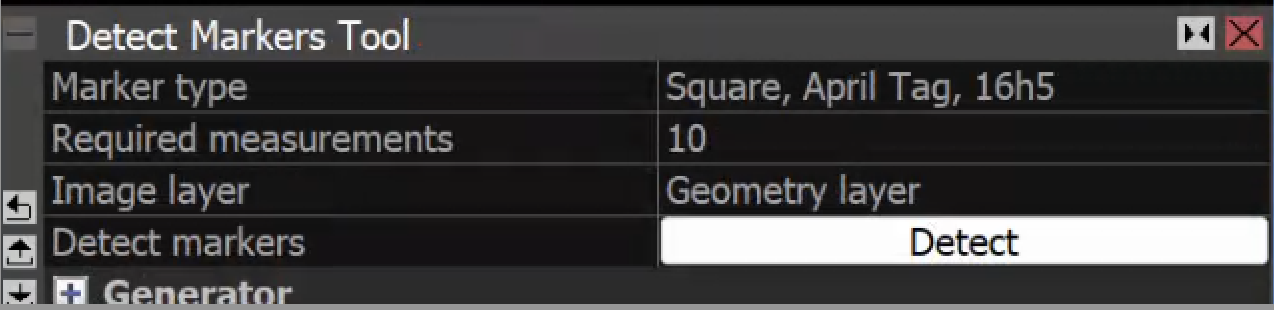
1. Bring both the sprayed images and the Marso Measure images to RS, detect markers with a minimum of 10 measurements and align.
2. Both datasets should align together at this stage.
3. Define a known distance between 2 control points. These could be 2 markers.
4. Remove any control points with poor measurement accuracy, or remove all control points except those required for scaling if you feel you will get a nice alignment second time round based on your first effort.
5. Align again.
#### Meshing and Preparing
1. Set the recon region for meshing.
2. Now only select the Marso Measure images and not the sprayed ones.
{% hint style="info" %}
To complete step 2, head to the console and use `-selectImage g/photo/`
{% endhint %}
3. Disable those images for meshing. If you do not have scanning spray and are only using cross-polarisation, skip this step and use all images for meshing.
4. Set the reconstruction region for meshing and mesh in normal detail.
5. Clean up mesh and make mask mesh if necessary.
6. Simplify and smooth mesh.
7. Unwrap mesh to a single 8k texture.
#### Export
{% hint style="warning" %}
Select only Marso Measure cameras again, using `-selectImage g/photo/`
{% endhint %}
1. Export the alembic.
2. Make sure only Marso Measure cameras are used again, then export your ST maps.
---
# Agent Instructions
This documentation is published with GitBook. GitBook is the documentation platform designed so that both humans and AI agents can read, navigate, and reason over technical content effectively. Learn more at gitbook.com.
## Querying This Documentation
If you need additional information that is not directly available in this page, you can query the documentation by asking a question.
Perform an HTTP GET request on the following URL with the `ask` and `goal` query parameters:
```
GET https://docs.m-xr.com/marso-measure/resources/photogrammetry-tips/reality-capture/marso-measure-and-reality-scan-cross-pol-or-sprayed-workflow.md?ask=&goal=
```
`ask` is the immediate question: it should be specific, self-contained, and written in natural language.
`goal` is what the user is ultimately trying to achieve, the reason they need the answer. Sharing it helps GitBook give you a better, more relevant answer. A goal is most helpful when it describes the outcome the user wants rather than restating the question. For example, with `ask=how do I create an API token`, a goal like `automate deployments from our CI pipeline` lets GitBook tailor the answer to that use case.
The response will contain a direct answer to the question and relevant excerpts and sources from the documentation.
Use this mechanism when the answer is not explicitly present in the current page, you need clarification or additional context, or you want to retrieve related documentation sections.